Chip
Chip component from the UILaunch design system, ideal for selection and filtering actions.
🔷 Chip
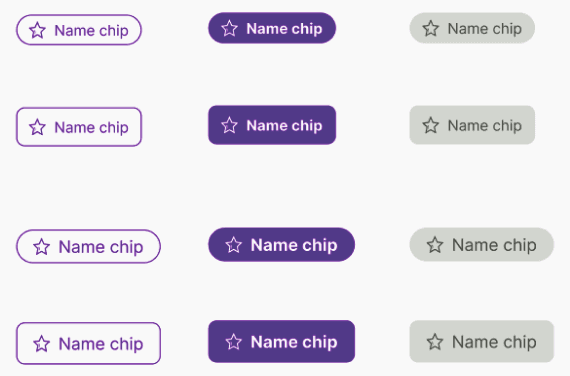
The Chip component is used for making selections, filtering content, or representing small blocks of information. It supports multiple visual variants and can optionally include icons on either side of the label.
Use Chip when you want to let users select categories, toggle filters, or trigger contextual actions with a compact UI element.
📦 Import
import Chip from '@madefordevs1999/ui-launch-native/system/molecules/Chip';
import ChipGroup from '@madefordevs1999/ui-launch-native/system/molecules/ChipGroup';
🧩 Usage
import Chip from '@madefordevs1999/ui-launch-native/system/molecules/Chip';
import ChipGroup from '@madefordevs1999/ui-launch-native/system/molecules/ChipGroup';
import { View } from 'react-native';

const App = () => {
  return (
    <View style={{ padding: 20 }}>
      <ChipGroup selected={['1']}>
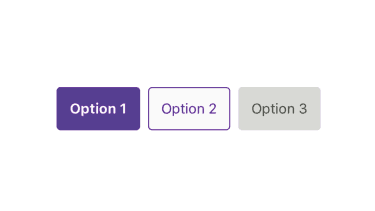
        <Chip id="1" text="Option 1" variant="filled" />
        <Chip id="2" text="Option 2" variant="outlined" />
        <Chip id="3" text="Option 3" disabled />
      </ChipGroup>
    </View>
  );
};

export default App;
Results
🧪 ChipGroup
Use the ChipGroup component to manage selection state. It supports single or multiple selection via the allowMultiple prop and handles orientation with the direction prop.
<ChipGroup allowMultiple direction="vertical">
  <Chip id="a" text="Tag A" />
  <Chip id="b" text="Tag B" />
</ChipGroup>
📜 Chip Props
| Prop Name | Type | Default | Description |
|---|---|---|---|
id | string | — | Unique identifier for the chip. Required. |
text | string | — | Text content inside the chip. |
variant | 'filled' | 'outlined' | 'ghost' | 'filled' | Visual style of the chip. |
disabled | boolean | false | Disables interactions and changes the appearance. |
rounded | boolean | false | If true, the chip will have full border radius. |
onPress | (id: string) => void | — | Callback triggered when the chip is pressed. |
startIcon | (selected: string[], color: string) => React.ReactNode | — | Optional function that returns a React element rendered before the text. |
endIcon | (selected: string[], color: string) => React.ReactNode | — | Optional function that returns a React element rendered after the text. |
| ...rest | PressableProps | — | All other props are passed down to the underlying Pressable. |
📜 ChipGroup Props
| Prop Name | Type | Default | Description |
|---|---|---|---|
selected | string[] | [] | IDs of the currently selected chips. |
onChange | (id: string) => void | — | Called when a chip is selected/deselected. |
allowMultiple | boolean | false | If true, allows multiple chips to be selected. |
direction | 'horizontal' | 'vertical' | 'horizontal' | Layout direction of chips within the group. |
🔁 Controlled Usage
You can fully control the chip group selection state:
const [selected, setSelected] = useState<string[]>(['id1']);

<ChipGroup
  selected={selected}
  onChange={(id) => {
    setSelected(prev =>
      prev.includes(id)
        ? prev.filter(chipId => chipId !== id)
        : [...prev, id]
    );
  }}
  allowMultiple
>
  <Chip id="id1" text="Option A" />
  <Chip id="id2" text="Option B" />
</ChipGroup>
📘 Notes
- The Chip uses the design system’s spacing, color, and radius tokens to ensure visual consistency.
- The component automatically updates its appearance based on the ChipGroup context.
- You can use startIcon and endIcon to customize the look with icons or custom elements.